
Kinesis explanation
This is a demo of Kinesis. It mimics the behaviour of FlightRadar24, but using my own sensor and Kinesis Streams.
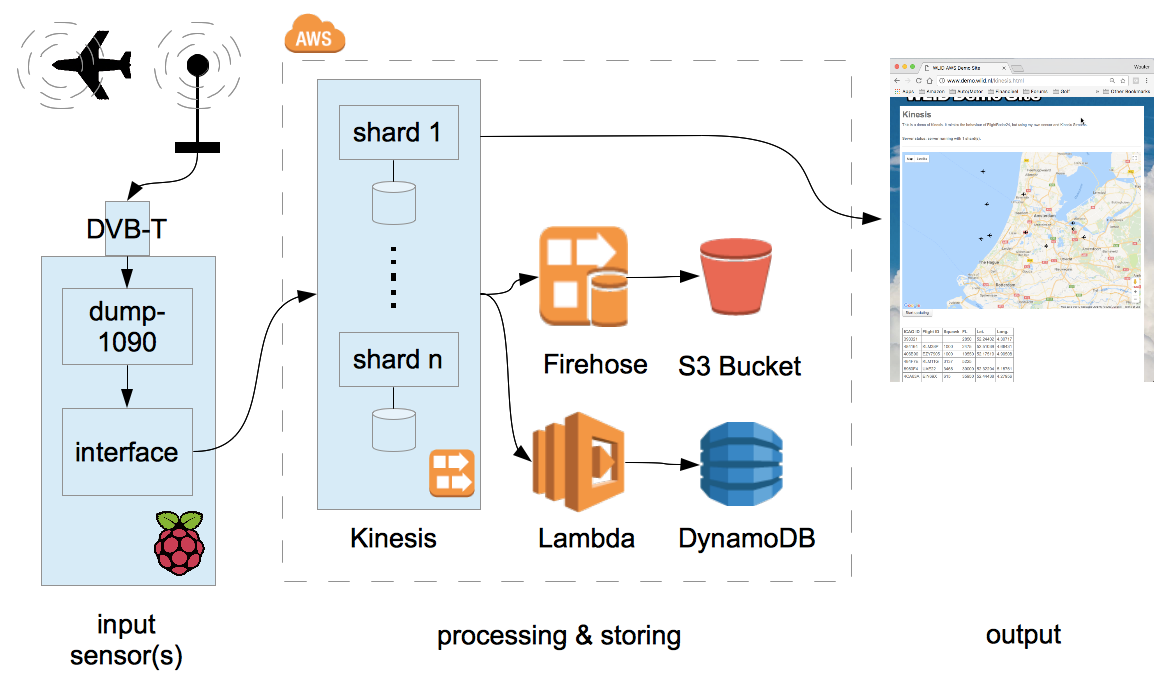
Input generation
Kinesis starts with something that generates input. This can be a dedicated sensor, or a mobile app, or something else that generates streaming data. For this demo, I built my own ADS-B receiver.
ADS-B is the signal emitted by an aircrafts transponder. It is used by Air Traffic Control to determine heading, altitude, speed, position and a few other parameters. These are then displayed on the controllers screen. ADS-B is also used in airborne collision avoidance systems, where pilots are automatically notified in situations where there's a risk of collision. These signals are broadcast signals and can be picked up by receivers several hundreds of kilometers away.
The ADS-B signal is transmitted on the 1090 MHz frequency, which puts it very close to the frequency band used by Digital Video Broadcast (DVB-T). This means you can use a cheap DVB-T receiver, combined with GNU Radio and a program called Dump-1090 (all Open Source) to receive it.
The output of Dump-1090 is as follows:
MSG,4,,,738065,,,,,,,,420,179,,,0,,0,0,0,0
MSG,3,,,738065,,,,,,,35000,,,34.81609,34.07810,,,0,0,0,0
...
Each ADS-B signal received is a single line, which starts with the MSG keyword. There are several message types (field 2) but all messages will always contain the ICAO ID, a unique number that has been permanently assigned to the aircraft, in field 5. This then becomes the partition key that we can use to send data to Kinesis. The other fields encode speed, heading, altitude, transponder code, flight ID, position and a few others. But as you can see from the data, not all fields are always present.
Dump-1090, by the way, can also feed the received signal to FlightAware/FlightRadar24, but that's not what we're doing here. What I have written instead is a simple Python program that takes the output of dump-1090, extracts the individual records, converts them into a format that Amazon Kinesis can work with, and feeds them into Kinesis.
The meat of the program is simple:
while True:
	# Read data from the dump-1090 socket
	data = s.recv(BUFFER_SIZE)

	# Prepare the Kinesis request
	records = [];
	for line in data.splitlines():
		# Extract partition key.
                # We're using the ICAO Hex ID so all data from one A/C records end up in one shard
		splitline = line.split(',')

		if( ( len( splitline ) < 5 ) or ( splitline[0] != 'MSG' ) ):
			# It's not a valid message. Skip.
			continue

		icaoid = splitline[4]
		records.append( { 'Data': line, 'PartitionKey': icaoid } )

	# Occasionally we may have no valid data.
	if len( records ) == 0:
		sleep( 0.1 )
		continue

	# TODO: Check we're not sending more than 5 MB data here, otherwise split the array

	# Write data to Kinesis, at most MAXMSGS (500) at a time.
        i=0;
        while i<len(records):
		request = { 'StreamName': STREAMNAME, 'Records': records[i:i+MAXMSGS] }
		response = kinesis.put_records( **request )
		i+=MAXMSGS
You can download the full Python script here.
Both dump-1090 and this Python interface program run on a Raspberry Pi 1B with Pidora. That's pushing it: The CPU is normally about 75-90% busy.
Data Ingestion with Kinesis Streams
A Kinesis Stream consists of a number of shards. The number is configurable, between 1 and whatever the soft limit for your account is set to (default: 200). Based on the partition key that you supplied with the data, Kinesis will automatically send each record to the right shard. Each shard can be viewed as an individual buffer: All records that end up in the shard are buffered for 24 hours. (You can extend this to seven days for an additional fee.)
Once the data is in Kinesis, other users can pull the data out. There are two things important to know about this process:
- Kinesis is not an SQS queue where messages are eventually deleted. Instead, records are retained in Kinesis regardless of the number of users that read the message. This means that you can have as many users of the Kinesis data as you want - up to the limit of what your combined number of shards is able to handle.
In order for a user to specify what messages he wants, you need to supply an "Iterator" in your GetRecord or GetRecords request. This is the identifier of the first message you'd like to receive. Once you open a stream for the first time, you need to determine the iterator. This is a special API call where you specify how far back in time you will want to go. Normally this is "LATEST", so that you don't receive any old data. But you also have the option of specifying a particular timestamp, or a particular message ID. Or you can specify "TRIM_HORIZON", which gives you everything the shard has, up to 24 hours (or seven days) old. - If you write your own application, you either have to write it so that your application polls all shards sequentially or in parallel, or you run one instance or thread per shard. Obviously the latter solution is the one that is most scalable.
Data processing with Firehose
Kinesis Firehose is a service that will attach itself to a Kinesis Stream, using as many worker processes as necessary to cover all shards. It will receive all records and will forward them to, at your option:
- An S3 Bucket
- A Redshift database
- An Elasticsearch service
- Splunk
Optionally, Kinesis Firehose has the ability to filter your records through an AWS Lambda script. This allows you to perform data transformation on the fly.
In this demo, the records are simply written to S3 without transformation. Similar to how CloudTrail does things, the data in the bucket ends up with a prefix that's based on date/time, and individual bucket objects within that prefix contain several records each.
Data processing with AWS Lambda
Another way of using Lambda with Kinesis is by writing a standalone Lambda application, and then adding a Lambda Trigger for your Kinesis Stream. The Lambda Trigger will continuously poll the stream to see if any new records have arrived. If that's the case, the new records will automatically be pulled from Kinesis, and delivered to your Lambda script as input. To make things efficient, you can setup the trigger to deliver 100s of messages in one invocation of Lambda.
Lambda can then process the input in the normal fashion. In this demo, I'm using the input to update the aircraft records in DynamoDB. So my DynamoDB table always has the latest position, altitude and such for each known aircraft.
The meat of my Lambda script is as follows:
exports.handler = (event, context, callback) => {
    /* Process the list of records and transform them */
    event.Records.forEach( function(record) {
	/* Payload data arrives Base64 encoded */
        var payload = new Buffer( record.kinesis.data, 'base64').toString('ascii');

        /* Extract data from payload */
        var dataarray = payload.split(",");
        var icaoid = dataarray[4];
        var squawk = dataarray[17];

        /* Handle payload processing */
    }

    callback( null, "" );
}
(Actually, my script is a lot more complex than this. There's a number of complications that I needed to solve. The first complication is that ADS-B messages come in different types, and each type holds a specific bit of information. Aircraft may emit several different message types in very short succession to get all the data out. You don't want to run a DynamoDB update for each and every individual message, so the script keeps a list of modifications per aircraft. All the messages coming in are processed against this list, and at the end of the invocation, the list becomes the basis of generating the DynamoDB updates: one per aircraft. This reduces the amount of DynamoDB calls by a factor of 25, on average.
The second thing that adds a lot more complexity is the fact that the recordset that is supplied with a single invocation of Lambda may contain updates for several or even several dozens of aicraft. As each aircraft is a single item in DynamoDB, this leads to several or several dozens of asynchronous DynamoDB update calls. In Node.js, you have to use something like Promise() to handle this properly.
You can download the full Lambda script here.)
Data processing with custom applications
The third example in the demo is a custom application. Essentially it polls each shard in turn to see if new messages are available. If so, it receives and processes these messages. The API call that returns the messages also returns the next Iterator, so the next call can use this Iterator to make sure messages are only received once.
In order to work properly, the application already needs to know the stream name. It can then pull the stream details and the iterators for each shard using the following code:
// Global vars
var shards = {};

// Get the stream shards
var params = {
  StreamName: STREAMNAME
}
kinesis.describeStream( params, function(err, data) {
  if (err) {
    console.log(err, err.stack); // an error occurred.
  } else {
    console.log(data);           // successful response

    // Find all shards
    for( var j=0; j<data.StreamDescription.Shards.length; j++ )
    {
      var shardId = data.StreamDescription.Shards[j].ShardId;

      params = {
        StreamName: STREAMNAME,
        ShardId: shardId,
        ShardIteratorType: 'LATEST'
      }

      kinesis.getShardIterator( params, function(err, data) {
        if (err) console.log(err, err.stack); // an error occurred
        else {
          console.log(data);           // successful response

          // Record the shardid and sharditerator in the 'shard' dictionary.
          shards.push( { ShardId: shardId, ShardIterator: data.ShardIterator } );
        }
      });
    }

    // Next, start the updater
    updaterId = setInterval(updateView, UPDATEINTERVAL);
  }
});
The application then polls the Kinesis stream at regular intervals. Any records returned are processed:
function updateView()
{
  // For each shard, retrieve the records
  for( let i=0; i<shards.length; i++ )
  {
    console.log( "updateView: Going to poll shard ", shards[i].ShardId );

    params = {
      ShardIterator: shards[i].ShardIterator,
      Limit: 100
    };

    kinesis.getRecords( params, function(err, data) {
      if (err) console.log(err, err.stack); // an error occurred
      else
      {
        console.log( "updateView: Received response from getRecords:" );
        console.log(data);           // successful response

        for( var j=0; j<data.Records.length; j++ )
        {
          // Process the record here.

        }

        shards[i].ShardIterator = data.NextShardIterator;

	console.log( "updateView: We're ", data.MillisBehindLatest, " behind." );
        if( data.MillisBehindLatest > 500 )
        {
          // Not a very nice way of doing things. You'd really want to do this in a proper loop. But that
          // would require making the call synchronously using Promise() or something similar.
          // This quick and dirty method works
	  console.log( "updateView: Calling updateView again." );
          updateView();
        }
      }
    });
  }
}
Note that this particular application polls all shards. The application itself may therefore become a bottleneck. You may want to rewrite things so that each application instance handles its own shard. In this case I want the users browser to show all aircraft, so it needs to poll all shards.
The other thing to note is that this code does not handle any shard split/merge operations. If you intend to split or merge your shards on the fly to deal with an increase/decrease of demand, you should perform a describeStream operation every now and then, and update the shard dictionary accordingly. To avoid losing data, make sure you use TRIM_HORIZON in the getShardIterator request for each new shard. And a shard can be considered closed if an EndingSequenceNumber is available, so once you've read all the data from the shard, you don't need to poll it again.
A Kinesis stream costs money per running hour, so I don't have this demo running 24/7. Instead, I use this CloudFormation template to deploy the demo as needed.